XP Values Configuration
Customize XP per block, item, and weapon
Overview
XP values are stored in mods/mmoskilltree/xp-maps.json using an override-based system. The file only contains your customizations - defaults are built into the mod.
Pattern Matching
Block and item IDs use substring matching:
Ore_matches ALL ores (Ore_Iron_, Ore_Diamond_, etc.)Ore_Diamond_matches only diamond ore variantsWood_Logmatches all log types
Commands
# Set XP for a pattern
/mmoconfig mining --args=Ore_Diamond_|150

# Set XP for all ores (wildcard)
/mmoconfig mining --args=Ore_|25

# View current values
/mmoconfig list --args=mining

# View only your customizations
/mmoconfig diff --args=mining

# Reset a pattern to default
/mmoconfig remove --args=mining|Ore_Diamond_

# Disable a pattern (no XP)
/mmoconfig disable --args=mining|Wood_Log
File Structure
{
  "schemaVersion": 1,
  "xpMaps": {
    "MINING": {
      "Ore_Iron_": 50,
      "Ore_Diamond_": 150,
      "Wood_Log": -1
    },
    "WOODCUTTING": {
      "Wood_Oak": 10
    }
  }
}
Special Values
-1- Explicitly disable a pattern (no XP given)0- Pattern gives zero XP (still processed)- Positive number - XP awarded for matching blocks/items
Reference Files
Check mods/mmoskilltree/_reference/defaults-xp-maps.json for all default values. This file is auto-generated and read-only.
Admin UI
Use /mmoadmin → "Edit XP Values" for a visual editor:
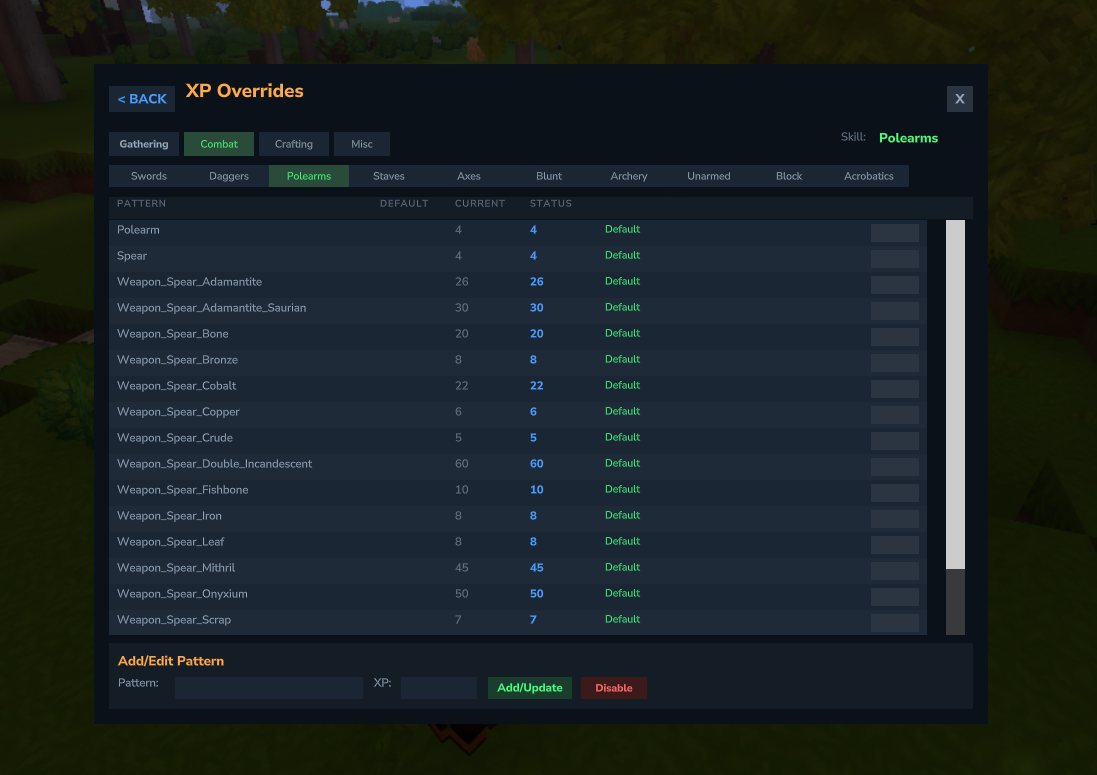
- Browse by category and skill
- See default vs. current values
- Status indicators: Default (green), Override (orange), Disabled (red)
- Click pattern name to copy to text field
Best Practices
- Use specific patterns before wildcards (more specific = higher priority)
- Test with
/mmoconfig listto verify patterns match correctly - Use
/mmoconfig trimto remove redundant overrides - Back up your
xp-maps.jsonbefore major changes