Configuration
Server owner guide to customization
Admin UI
The fastest way to configure common settings is via /mmoadmin:
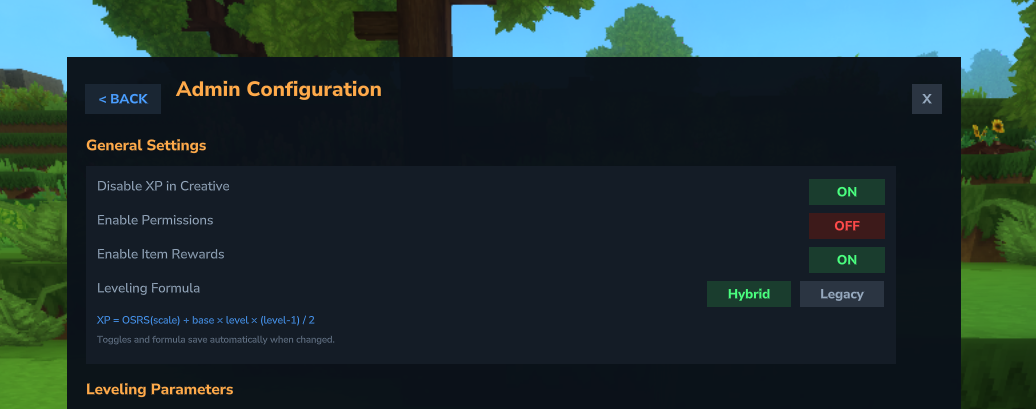
- Disable XP in Creative - Toggle whether creative mode players gain XP
- Skill Permissions - Toggle permission-based skill access
- Item Rewards - Enable/disable item rewards at milestones
- Boost Stacking Limits - Configure max multiplier, active boost caps, and stack mode
- Allow Skill Tree Reset - Toggle whether players can respec their reward choices
- Max Levels - Set a default max level for all skills (shipped default: 200) and override it per-skill. XP stops being awarded once a skill reaches its cap
- Milestone Announcements - Run commands when players reach configurable level milestones (e.g., broadcast achievements with
/say) - Award Boost - Grant boost permissions or tokens to players
- Mob Kill XP - Configure per-mob XP values and weapon scaling for kill-only combat mode
- Edit XP Maps - Visually edit XP values per skill
- Edit Rewards - Visual editor for command rewards per skill and level
- Edit Skill Tree - Customize skill tree reward tiers, levels, and choices
- Edit Tokens - Browse and modify XP token and boost token values
Changes made via /mmoadmin are saved immediately to the config files.
Two different numbers: content cap vs. configurable ceiling
defaultMaxLevel a fresh server actually ships with is 200, the shipped default you change in custom-skills.json or from the admin UI, leaving headroom above the designed content for a server owner who wants to author further tiers. There is no hard-coded upper limit above 200 either - defaultMaxLevel and per-skill overrides only floor-clamp to 1.In-Game Help Guide
Every admin page has a ? button that opens a contextual help card for that specific feature. Each card has an Overview, How It Works, Examples, and Tips section, plus a link to the full online docs. The help content is localized through the standard language files so translated servers get a fully localized guide.
Config Files
The mod's own configs live in mods/mmoskilltree/ (29 files plus the quests/, achievements/, and optional localization/ folders). A second folder, mods/ziggfreedcommon/, is generated by the required companion jar and holds the files listed further down.
Prefer a content pack for content
Mods/ folder and loaded at restart, so an update never overwrites your work. The files in the table below are server-side tuning and per-id overrides. See Content Packs and Publishing.| File | Purpose | Type |
|---|---|---|
skill-config.json | Core settings: leveling formula, default language, permissions, placed-block tracking, combat-XP mode + blacklist, boost-stacking limits, damage cap, dodge timing. Detailed guide | Traditional |
database.json | Player-data backend selector + tunables (ecs default | postgres | mysql): pool, flush, connection timeout, dbDownPolicy; holds no credentials. The file itself is unchanged in 1.6.0; what a database row holds is: a player's quests and achievements are ONE record (the shared library's), stored under one PROGRESS domain beside SKILLS, STATISTICS and STATIONS. The separate QUESTS and ACHIEVEMENTS domains an earlier 1.6.0 build wrote are not read; a row left under either simply sits in the table. | Standalone |
hud-layout.json | Where each on-screen HUD sits and how it behaves, keyed by HUD: its position, whether it is enabled at all, and how long a transient card stays up (durationMs). Covers the quest tracker, the ability cooldown row, and the cards the optional MMO Mob Scaling mod adds. Only the keys you set are stored; a HUD with no entry uses its own default. | Override |
ability-settings.json | Server-wide ability toggle plus dodge/counterattack timing (dodge window, armed-slot duration). Detailed guide | Override |
ability-overrides.json | Per-ability owner tuning layer over the pack-authorable Server/MMOSkillTree/Abilities/*.json assets; a partial body (e.g. just Cooldown) overlays per-leaf onto the folded ability instead of replacing it wholesale. Replaced the retired abilities.json. Detailed guide | Override |
power-level.json | Owner overlay for the Power Level formula (pillar weights, clamp range, per-mode COMBAT_ONLY/BALANCED/COMPLETIONIST tuning) over the jar-bundled defaults; folds defaults < pack < owner per leaf. | Override |
ability-clamps.json | The safety rails on ability-modifier stacking: per-stat min/max bounds that folded gear and mastery bonuses can never push past. Each entry under "clamps" is a PascalCase fragment over the pack-authorable Server/MMOSkillTree/ModifierClamps/ assets, overriding just the bound you name per stat key; a key the table has no entry for declares a new clamp. /mmoconfig reload picks up an edit without a restart. Detailed guide | Override |
mastery.json | Mastery on/off, respec rules (respec.defaultRefundPercent), the statSacrifice.minRemaining floors, and per-track tuning at schema v3: each entry under "tracks" is a PascalCase track fragment in the same schema a pack authors (Server/MMOSkillTree/Masteries/), merged per leaf over the loaded track of that id, so one price can change and everything else stays the pack's; {"Enabled": false} parks a track. A pre-1.6.0 file still carrying old-format track bodies (the lower-case target/nodes grammar or the retired extends/params DSL) is moved to a timestamped backup/ copy on first start with one notice; the web Migration Converter rewrites it into the v3 overlay. The tracks themselves ship as content (a content pack, or your own JSON assets). Detailed guide | Override |
combat-text.json | Colored floating combat text (red crit, gold level-up): master and per-event toggles plus a configurable color per event. | Override |
feedback.json | Sound + optional camera-shake cues per moment (crit, finisher, kill, level-up, bounty); combat sounds ship off by default. | Override |
npc-placements.json | On/off switch for every placed NPC (the Adventurer's Guide, quest givers, anything a pack places): {"<placementId>": {"enabled": false}}, or "*" to disable them all; a disable despawns the NPC already standing. Where an NPC stands, which worlds it appears in, and what pressing F does are content (Server/ZiggfreedCommon/NpcPlacements/<id>.json), not settings, so this file is only the kill switch. Lives in mods/ziggfreedcommon/, not mods/mmoskilltree/ (a ziggfreed-common owner file); /mmonpc manages it live. Replaces the retired spawn-hub.json and quest-givers.json. Detailed guide | Override |
dialogues.json | Your own version of any conversation on the server. Conversations are content, authored in one folder every mod reads back (Server/ZiggfreedCommon/Dialogues/<id>.json), and this file is a bare map keyed by conversation id, exactly like its sibling owner files: each entry is folded over the stored conversation LEAF BY LEAF, so you restate only the nodes and fields you want changed and everything else survives. Top-level keys starting with $ are reserved ($Comment, $SchemaVersion). Lives in mods/ziggfreedcommon/, not mods/mmoskilltree/ (a ziggfreed-common owner file); replaces the retired mods/mmoskilltree/dialogues.json, which is renamed to .legacy on first start. | Override |
world-rules.json | Per-world rules matched through a Where block (four wildcard Match patterns - Foo_* prefix, *_Foo suffix, *Foo* contains, bare * - or the world's own stable GameplayConfig key, needed for instanced worlds that carry both a prefix and a random suffix). The gameplay knobs live in one nested Rules block per rule (1.6.0): XP multiplier, combined abilities + HUD toggle, weapon-combat toggle, per-world disabled/allowed skills, and the StatBonusesEnabled switch (strips/restores persistent stat rewards on world entry/exit, independent of the combat-time-only CombatBonusesEnabled); the flat 1.5.x spelling of those knobs still works this release, with one boot warning per rule naming the nested group (a nested leaf wins over its flat twin). The old flat Match string (no Where wrapper) was retired outright: a rule still carrying it matches no world at all until it is rewritten, and the server logs one warning per affected rule naming the replacement. /mmomigrate --action=owner and the web Migration Converter make both moves for you. | Override |
xp-maps.json | XP per block / item / weapon for each skill. Detailed guide | Override |
bonus-drops.json | Everything extra a broken block or a killed mob hands over on top of its own normal drops: which moment a row answers for (BreakBlock / KillMob), which block or mob it covers, the odds, and what it gives (a shared loot table, a drop list, an exact item, a command, a reward). New in 1.6.0, folding luck-loot.json and mob-drops.json into one table (converted in place on first boot, every override carried across); retunes or switches off any shipped row by name, or adds your own with no content pack. Detailed guide | Override |
skill-tree.json | Milestone levels, reward choices, multi-select tiers, and ability-unlock placement. Detailed guide | Override |
command-rewards.json | Item rewards and commands granted at skill milestones. Detailed guide | Override |
mob-kill-xp.json | Per-mob base XP for kill-only combat mode. Detailed guide | Override |
mob-drop-commands.json | Opt-in command-based mob drops (dropList key) with chance and notifications; ships with zero default pools, off by default since 1.5.0. Schema 4: the per-command delay and the requiredTier filter are retired, each named in its own boot warning when an old file still carries it, and a pool's commands always run immediately in the order written. It stays the simple kill-only surface beside bonus-drops.json, and is consulted first for a kill. Detailed guide | Override |
pending-rewards.json | Not something you edit directly - the durable runtime spool holding a reward that couldn't be delivered immediately (an admin completing a quest for an offline player), paid out the next time that player connects. Entries are keyed by player UUID only, so a queued reward with no resolvable UUID refuses loudly instead of queueing into the dark. Replaces pending-quest-rewards.json, which is drained into it once on the first boot after upgrading and then backed up; any entry that was keyed by name instead of UUID stays in the backup and is named in the notice. | Standalone |
xp-tokens.json | XP token amounts, boost multipliers / durations, and enable / disable. Detailed guide | Override |
item-requirements.json | Skill-level requirements for items, weapons, and blocks. Detailed guide | Override |
action-requirements.json | Tool-type requirements for blocks and weapon-type requirements for mobs. Detailed guide | Override |
boost-templates.json | Permission-based boost definitions (multiplier, duration, cooldown). Detailed guide | Override |
custom-skills.json | Custom skill definitions and built-in skill enable / disable. Detailed guide | Override |
white-label.json | Server branding (name, description, logo) on UI pages. A whole-record file, not an override layer: every save from the White Label admin page rewrites the whole file, and /mmoconfig reload re-reads a hand-edited copy. | Standalone |
menu-theme.json | The server-wide active menu theme, written by /mmotheme and the in-game theme picker. A whole-record write, not an override layer; /mmoconfig reload re-reads a hand-edited copy. | Standalone |
reward-icons.json | Per-skill / per-target / per-reward-type icon overrides. | Override |
integrations.json | Enable / disable / prioritize mod integrations (auto-generated). Detailed guide | Override |
quests/ | Migrated on the first start after 1.6.1: every quest here is rewritten into mods/ziggfreedcommon/quests/<Id>.json, one file per quest in the shared shape, the original renamed .legacy beside it, with one startup notice naming every file, quest and dropped field. Not read any more; author new quests in the new folder. Detailed guide | Folder |
achievements/ | Per-achievement definition files: criteria, milestones, server-first claims. Detailed guide | Folder |
localization/ | All display text in any language (overrides the jar-bundled .lang files). Detailed guide | Folder |
Shared library files (mods/ziggfreedcommon/)
The required ZiggfreedCommon jar keeps its own folder beside this one, because it owns the engines behind wallets, storefronts, boards, placed NPCs and the placed-block ledger. Some of these are yours to edit; the runtime stores are not.
| File | Purpose |
|---|---|
quests/ | Your own quests, one file per quest named after the quest id (Gather_Copper.json is gather_copper), in the same shape a content pack ships under Server/ZiggfreedCommon/Quests/. A file named after a quest the jar or a pack ships merges leaf by leaf over it, so a file holding only {"Enabled": false} switches that quest off and one holding only an Amount retunes one step; a new name is a quest of your own, and Parent works as in a pack. Read afresh on every publish (/zigprogress reload, /mmoquestadmin reload, a hot re-import). The older mods/mmoskilltree/quests/ files are migrated into it on the first start after 1.6.1. Detailed guide |
npc-placements.json | The on/off switch for every placed NPC: {"<placementId>": {"enabled": false}}, or "*" to disable them all. Where an NPC stands and what pressing F opens is content, so this file is only the switch. /mmonpc edits it live. Detailed guide |
currencies.json | Owner overrides for wallets, by currency id and leaf by leaf: retune a cap, change an icon or colour, or switch a wallet off without touching the pack that shipped it. Detailed guide |
shops.json | Owner overrides for storefronts, by shop id and leaf by leaf: reorder the shelves, retitle one, or close a shop with {"<id>": {"Enabled": false}}. Detailed guide |
shop-pools.json | Owner overrides for the rotating pools a storefront draws its offers from: how often the rotation turns over, how many slots it fills, and what a reroll costs. Detailed guide |
boards.json | Owner overrides for bounty boards, by board id and leaf by leaf: rotation cadence, the slot and difficulty mix, reroll cost and cap, the accept requirements per band, or {"<id>": {"Enabled": false}} to take a board down. Detailed guide |
dialogues.json | The owner layer over every conversation: a bare map keyed by conversation id, like its sibling owner files. An entry is merged leaf by leaf over the stored Server/ZiggfreedCommon/Dialogues/<id>.json conversation, so a partial entry retunes just the nodes it names; $-prefixed top-level keys are reserved ($Comment, $SchemaVersion). Replaces the retired mods/mmoskilltree/dialogues.json, whose contents are not carried across. Detailed guide |
hud-rows.json | Owner overrides for the rows the activity ledger draws, one per XP source, by row id and leaf by leaf: switch a source off, recolour it, or hold it on screen longer ({"wood_off": {"Source": "WOOD", "Enabled": false}}); an id no pack shipped stands on its own by naming its Source. Detailed guide |
hud-panels.json | Owner overrides for the shared HUD panels (the XP bars, the activity ledger, the quest tracker), by panel id and leaf by leaf: the spot a panel sits at ({"World_Bars": {"Placement": "Bottom_Left"}}), its offset, how many lines it shows. The HUD settings page writes this file for everyone and re-reads it. Detailed guide |
hud-spots.json | Owner overrides for the spots a panel can sit at, by spot id: nudge a shipped spot ({"Bottom_Left": {"Position": {"OffsetY": 40}}}) or add a spot of your own by naming it here. Detailed guide |
hud-cards.json | One leaf, Color, over the frame every HUD card shares (both bar panels, the quest tracker, a mod's own panel on the same base): six hex digits tint the shipped frame, eight add a transparency ({"Default": {"Color": "#ffffffb8"}} dims every card to about 72 percent at once). A card with a Color of its own wins. Detailed guide |
quest-indicators.json | Owner overrides for what a character shows over their head and on the map per quest situation (Available, InProgress, Collect, TurnIn), leaf by leaf over the shipped Default ({"Default": {"InProgress": {"Overhead": {"Enabled": false}}}}); a quest or a single step narrows it further in its own file. Detailed guide |
encounters.json | Owner overrides for boss encounters, by encounter id and leaf by leaf: take a boss out of rotation ({"<id>": {"Enabled": false}}) or retune its scaling ({"<id>": {"Scale": {"HealthPerMember": 0.5}}}). Re-read by /zigencounter reload. Detailed guide |
encounter-participation.json | Owner overrides for an encounter's participation rules (which players a fight credits), by rule id and leaf by leaf. Re-read by /zigencounter reload. Detailed guide |
placed-blocks.json | Retired in 1.6.1: the 1.6.0 file that remembered which blocks a player placed is renamed to .legacy on first boot with one notice and its rows are not carried across. A placement is one bit on the chunk the block sits in now, saved and loaded with it, with nothing left to scan or grow; blocks placed before the update stop being remembered, everything after is guarded as before. The two remaining knobs (trackPlacedBlocks, placedItemExpireMinutes) live in skill-config.json. Detailed guide |
npc-placement-ledger.json | Not something you edit - the runtime record of which placements have already been placed in which world, so a restart does not spawn a second copy of the same character. Detailed guide |
What each one holds, and which content folders they override, is on ZiggfreedCommon: shared engines & files.
Upgrading from 1.5.x?
/mmomigrate does for you, and every retired file with its replacement.Config Types
Override-Based Configs
Most config files (hud-layout.json, ability-settings.json, ability-overrides.json, power-level.json, ability-clamps.json, mastery.json, combat-text.json, feedback.json, npc-placements.json, dialogues.json, world-rules.json, xp-maps.json, bonus-drops.json, skill-tree.json, command-rewards.json, mob-kill-xp.json, mob-drop-commands.json, xp-tokens.json, item-requirements.json, action-requirements.json, boost-templates.json, custom-skills.json, reward-icons.json, integrations.json) use an override system:
- Files store only your customizations, not all defaults
- Your changes are preserved across mod updates
- New defaults are added automatically
- Use
/mmoconfig diffto see what you've changed - Use
/mmoconfig trimto remove redundant XP entries - rows that merely restate a built-in value. It applies to XP overrides only; every other override layer merges field by field over an asset rather than restating it whole, so there is nothing redundant for a trim to find
Traditional Configs
Other configs store all values and may be regenerated on version updates. Your old config is backed up automatically.
Quick Config Examples
# Set diamond ore to 150 XP
/mmoconfig mining --args=Ore_Diamond_|150

# All ores give 25 XP (wildcard pattern)
/mmoconfig mining --args=Ore_|25

# Disable a default pattern
/mmoconfig disable --args=mining|Wood_Log

# View your customizations
/mmoconfig diff --args=mining

# Remove a customization (revert to default)
/mmoconfig remove --args=mining|Ore_Diamond_

# Harder early game
/mmoconfig basexp --args=400

# Easier endgame
/mmoconfig scale --args=150
Detailed Guides
- Content Packs - Author content as a pack
- XP Values Configuration - Customize XP per block, item, and weapon
- Leveling Formula - Understand and tune the XP curve
- Anti-Exploit Features - Placed block tracking, entity blacklist
- Skill Tree - Customize reward tiers, choices, and combat targeting
- Command Rewards - Customize item rewards at skill milestones
- Mob Kill XP - Configure per-mob XP values and weapon scaling for kill-only combat mode
- Mob Drop Commands - The simple kill surface: run console commands or a native item drop when a mob dies
- Bonus Drops - Everything extra a broken block or a killed mob hands over, in one table you can re-tune row by row
- ZiggfreedCommon - What the required companion jar owns, its content folders, its owner files, and its commands
- Quests - Create quests with objectives, prerequisites, and rewards
- XP Tokens - Configure consumable XP tokens and boost tokens
- Achievements - Player achievement system with points, meta-chains, and server-first claims
- Power Level - Multi-pillar power formula for the optional MMO Mob Scaling companion mod
Notification Tuning
Combat can produce a lot of floating notifications - damage numbers, XP gains, crits, defense blocks, combo finishers. Two knobs control the noise level:
- Notification batching -
notificationBatchMsinskill-config.json(100 to 5000ms, default 1000) aggregates same-type notifications into one combined number. - Per-type toggles - players can silence individual notification channels (critical hits, lifesteal, defense blocks, fall damage, combo damage) from the Settings page, while keeping everything else on.
Reference Files
The mods/mmoskilltree/_reference/ folder contains read-only files showing all default values: one defaults-<config>.json per override config, for example defaults-xp-maps.json and defaults-skill-tree.json.
defaults-luck-loot.json is retired and retires itself on the first start after upgrading. The built-in lucky-find rows are readable files inside the jar now, at Server/MMOSkillTree/BonusDrops/, and each one carries comments explaining what it does. See Bonus Drops.
Hot Reload
Most config changes can be applied without restart:
/mmoconfig reload- Reload all configs from files/mmoconfig reloadlang- Reload language files/mmoconfig reloaddefaults- Reset to built-in defaults/mmoability reload- Re-read the ability catalogue and your ability overrides/mmoquestadmin reload- Re-read the MMO's own quest files and pack layers/zigprogress reload- Fold the shared quest and achievement assets again and publish them
Wallets, storefronts and boards reload with the asset stores rather than through a config command of their own, because their content lives in the shared library's folders. Run /zigcommerce validate afterwards to confirm the catalogue reads the way you meant it to.
Backing up and restoring your configuration and player data is covered once, on Server Operations: Backup & Recovery.